

The Full Guide to Using a Projector Throw Ratio Calculator for Flawless Screen Setup
Getting the perfect home theater or presentation setup starts with one crucial detail: placing your projector at the right distance from the screen. Too close, and the image spills over the edges. Too far, and the picture looks dim and small. This is where understanding and using a projector throw ratio calculator becomes essential. This guide will walk you through everything you need to know to achieve a perfectly sized and proportioned image every time.
What is Projector Throw Ratio?
The throw ratio is the relationship between the distance from the projector lens to the screen (the “throw distance”) and the width of the projected image.
The formula is simple:
Throw Ratio = Throw Distance / Image Width
For example, if your projector is 10 feet away from the screen and the image width is 5 feet, your throw ratio is 2.0 (10 ÷ 5 = 2). This is often expressed as a range (e.g., 1.5:1 to 2.0:1) for projectors with optical zoom lenses.
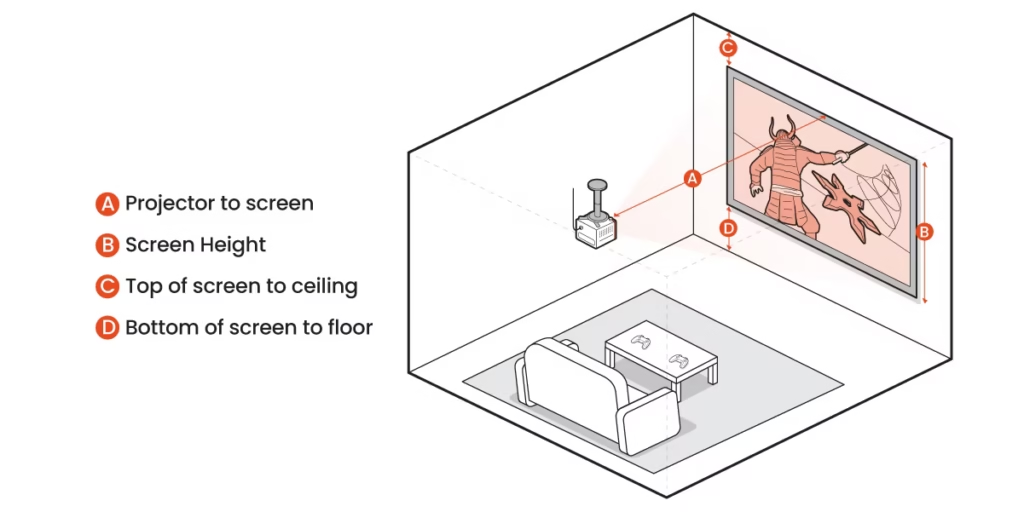
Why a Throw Ratio Calculator
Manually calculating distances and screen sizes can be tedious and error-prone. A dedicated projector throw ratio calculator (available as online tools or mobile apps) automates this process, offering several key benefits:
Saves Time and Effort: Input your projector model or its throw ratio and desired screen size; get precise mounting distances instantly.
Prevents Costly Mistakes: Avoid the hassle of returning a screen that’s too large or repositioning a ceiling mount after installation.
Optimizes Image Quality: Ensures your projector operates within its ideal range for the sharpest focus and brightest image.
Simplifies Planning: Essential for determining if a projector will work in your room before you purchase.

How to Use a Throw Ratio Calculator: A Step-by-Step Walkthrough
1.Find Your Projector’s Throw Ratio: Check the specifications in your user manual or on the manufacturer’s website. Note if it’s a fixed number (e.g., 1.2:1) or a range. 2.Choose Your Key Variable: Decide what you want to calculate:
Throw Distance: If you know your desired screen size.
Screen Size: If you have a fixed location for your projector.
3.Use the Calculator:
For Distance: Enter the throw ratio and your desired screen width. The calculator outputs the required distance from lens to screen.
For Screen Size: Enter the throw ratio and the measured distance from the projector’s planned location to the screen wall. The calculator outputs the possible image width.
4.Consider Lens Shift and Zoom: Remember that a zoom lens (indicated by a throw ratio range) gives you flexibility. A calculator can show you the minimum and maximum distances for your target screen size. Lens shift (optical image adjustment) does not affect the throw ratio calculation.
Key Factors Influencing Your Setup
While the calculator provides the core numbers, a perfect setup also depends on:
Room Dimensions: Account for furniture, walkways, and the projector’s own depth when measuring.
Lens Type: Short-throw and ultra-short-throw projectors have ratios below 1.0, allowing large images from very short distances—ideal for small rooms.
Screen Aspect Ratio: Match your projector’s native aspect ratio (usually 16:9 for home theater, 16:10 or 4:3 for business) to your screen for optimal use of the image panel.
Installation Type: Ceiling mounts may require extra space for the mount hardware and ventilation.
Pro Tips for a Flawless Installation
1.Measure Twice, Mount Once:
Always double-check your room measurements and calculator inputs.
2.Test Before Final Mounting:
Set up your projector on a temporary table to verify the image size and position.
3.Mind the Lens:
All measurements are taken from the front of the projector lens, not the body of the device.
4.Use the Right Calculator:
Many top projector brands (like Epson, BenQ, Optoma) offer accurate model-specific calculators on their websites.
Conclusion: Precision Leads to Perfection
Achieving a cinematic or professional presentation setup doesn’t have to involve guesswork. By understanding your projector’s throw ratio and leveraging the power of a dedicated projector throw ratio calculator, you can plan with confidence and execute a flawless installation. This essential tool takes the complexity out of the equation, ensuring your screen is perfectly filled with a bright, sharp, and immersive image from day one. Take the time to calculate correctly—your perfect viewing experience depends on it.